


Want real-time website analytics without Google Analytics? Cloudflare Stats Worker is a privacy-first analytics solution that runs entirely on Cloudflare's edge network.
Check out the live demo: stats.zakk.au
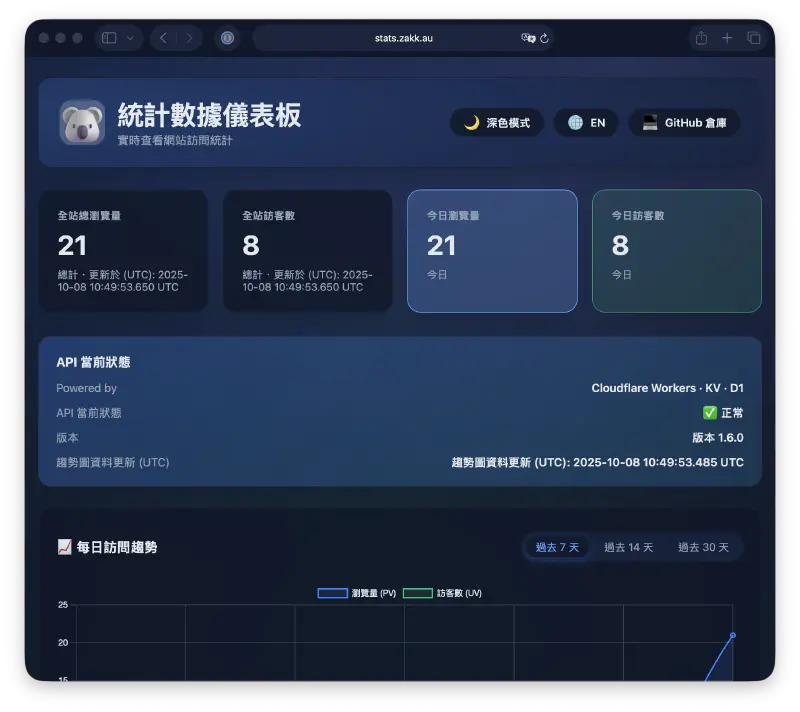
Why Cloudflare Stats Worker?#
- Privacy-First: No cookies, IP addresses are SHA-256 hashed and truncated
- Zero Cost: Runs on Cloudflare's free tier for most personal sites
- Edge Performance: Built on Cloudflare Workers + KV for global low-latency access
- Multi-Language Support: Automatically normalizes paths across different language versions
- Complete Solution: API endpoints + standalone dashboard in a single Worker
Key Features#
Real-Time Analytics#
- Today's PV/UV counters with live updates
- Historical trends for 7/14/30 days
- Top 10 most popular pages ranking
Beautiful Dashboard#
- Glass-morphism design with dark/light theme support
- Responsive layout for mobile and desktop
- Multi-language UI (English/Chinese)
- Accessible at your custom domain (e.g., stats.example.com)
Developer-Friendly API#
- RESTful API endpoints for custom integrations
- Batch operations for efficient data queries
- Health check endpoint for monitoring
Quick Deployment#
Requirements: Node.js ≥ 18,
wranglerCLI ≥ 3.0.
Clone and enter the repository
git clone https://github.com/Zakkaus/cloudflare-stats-worker.git
cd cloudflare-stats-worker
Install Wrangler and log in
npm install -g wrangler
wrangler login
Create the KV namespace
wrangler kv namespace create PAGE_STATS
wrangler kv namespace create PAGE_STATS --preview
Then paste the IDs into
wrangler.toml.(Optional) Enable D1 for trends and top pages
wrangler d1 create cloudflare-stats-top
wrangler d1 execute cloudflare-stats-top --file=schema.sql --remote
Uncomment the
d1_databasessection inwrangler.tomland set the generated IDs.Deploy 🎉
wrangler deploy
Step 7: Access Your Analytics Dashboard#
After deployment completes, visit your dashboard directly:
https://stats.example.com/You'll see a beautiful analytics interface just like stats.zakk.au with:
- Real-time metrics: Today's PV/UV cards with instant updates
- API health status: Visual indicator showing system status
- Trend charts: Interactive graphs for 7/14/30-day periods
- Top pages: Ranked list of your most popular content
- Theme toggle: Switch between dark and light modes
- Language selector: English and Chinese interface options
The dashboard is completely standalone - no embedding needed, just share the URL!
Pricing: Free Tier vs Paid Plans#
Workers#
| Plan | Price | Included Requests | CPU Time | Overage Pricing |
|---|---|---|---|---|
| Free | $0 | 100k requests/day | 10ms/request | N/A (hard limit) |
| Paid | $5/month | 10M requests/month | 50ms/request | $0.50 per additional 1M requests |
KV (Key-Value Storage)#
| Plan | Price | Reads | Writes/Deletes/Lists | Storage | Overage Pricing |
|---|---|---|---|---|---|
| Free | $0 | 100k/day | 1k/day each | 1 GB | N/A (hard limit) |
| Paid | Included in Workers Paid ($5/mo) | 10M/month | 1M/month each | 1 GB | • Reads: $0.50 per 10M • Writes: $5 per 1M • Storage: $0.50 per GB/month |
D1 (Serverless SQL Database)#
| Plan | Price | Rows Read | Rows Written | Storage | Overage Pricing |
|---|---|---|---|---|---|
| Free | $0 | 5M rows/day | 100k rows/day | 500 MB | N/A (hard limit) |
| Paid | $5/month | 25B rows/month | 50M rows/month | 5 GB | • Reads: $0.001 per 1M rows • Writes: $1 per 1M rows • Storage: $0.75 per GB/month |
Pay-As-You-Go Option#
Even without subscribing to paid plans, you can enable pay-as-you-go billing to avoid hard limits:
- Workers: $0.50 per 1M requests beyond free tier
- KV: Individual operation pricing as listed above
- D1: Individual operation pricing as listed above
Recommendation for This Project#
- Small personal blog (< 10k visitors/day): Free tier is perfect ✅
- Medium blog (10k-50k visitors/day): Workers Paid ($5/mo) recommended
- High-traffic site (> 50k visitors/day): Workers Paid + pay-as-you-go for KV/D1
Note: D1 is optional. If you only need real-time PV/UV counting, KV alone is sufficient and the dashboard still works (minus Top 10 trends).
API Endpoints#
Once deployed, you can access these endpoints:
# Health check
curl https://stats.example.com/health

# Page view count
curl "https://stats.example.com/api/count?url=/posts/example/"

# Overall statistics
curl https://stats.example.com/api/stats

# Daily trends
curl https://stats.example.com/api/dailyArchitecture#
Browser → Worker (stats.example.com)
          ├── /api/*     → Statistics API
          ├── /*         → Dashboard Static Files
└── Storage → Cloudflare KVFAQ#
Why not use Google Analytics?#
Self-hosted solutions give you complete data control, no cookies required, and won't be blocked by ad blockers.
Can I customize the dashboard?#
Yes! The dashboard source is in the dashboard/ folder. Modify the HTML/CSS/JS to match your brand.
How do I backup my data?#
Use the provided backup scripts to export KV data to R2 or GitHub periodically.
This is the same stack powering stats.zakk.au. After deployment, you'll have:
✅ A standalone analytics dashboard at your custom domain
✅ Complete REST API for statistics
✅ Privacy-focused tracking with no cookies
For questions or issues, visit GitHub Issues.